Consistent AI Characters: How to Keep the Same Face
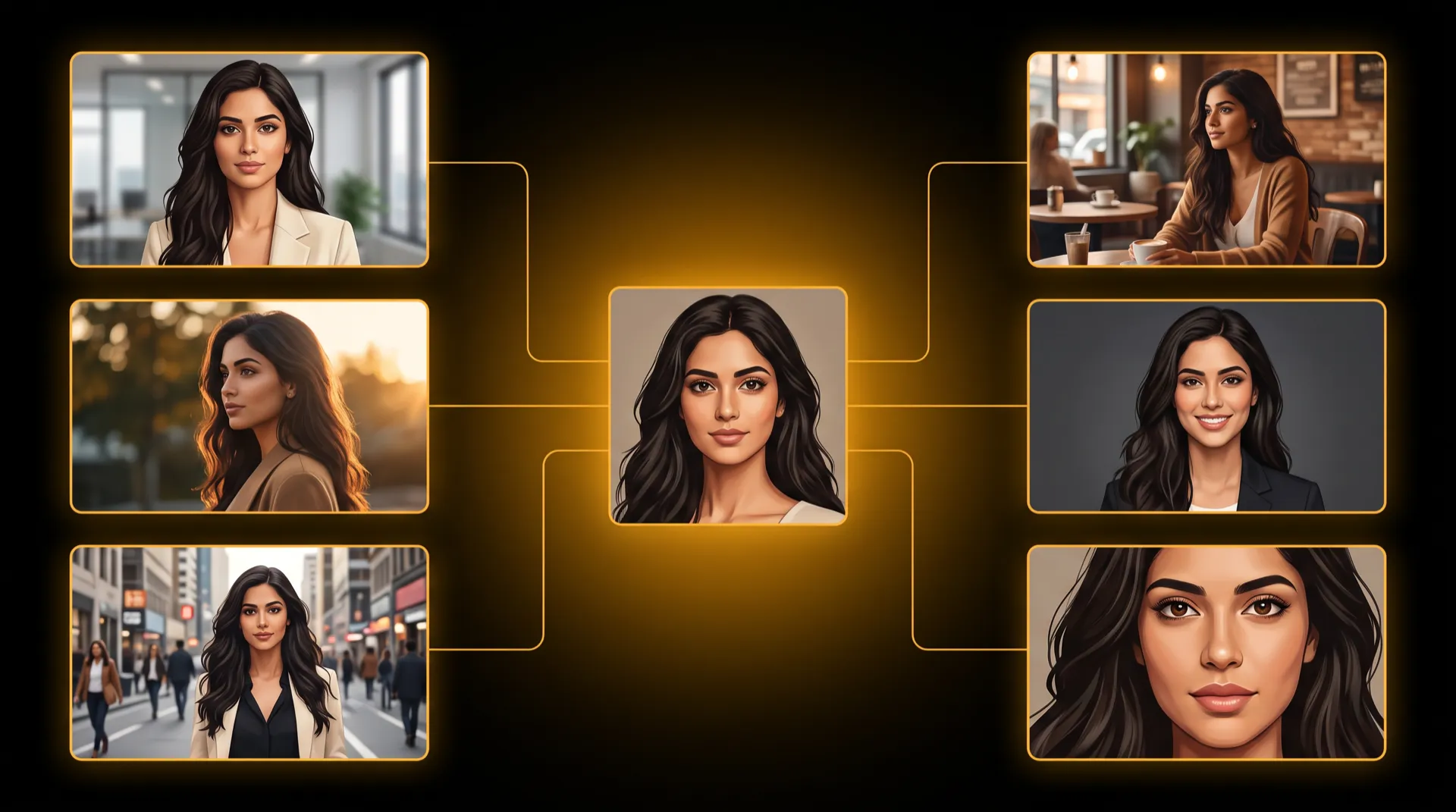
To get consistent AI characters, stop describing the person in words each time and start showing the model the same face. Build one reference sheet of the character from several angles, attach those same references to every generation, and use image and video models that accept reference images. Words alone produce a new face every time; references are what carry an identity from one scene to the next.
Why AI faces drift
If your AI person looks like a cousin of themselves in every new image, nothing is broken. That is how these models work.
- Every generation starts from random noise. The model shapes that noise toward your prompt. Different noise, different face, even with the same words.
- A description is a category, not an identity. “A woman in her 30s, dark curly hair, warm smile” fits millions of faces. The model picks a new one each time.
- Everything else in the prompt pulls on the face. Change the lighting, the angle, the outfit or the art style, and the face shifts with it.
- Video adds new angles. When the camera moves or the head turns, the model must invent views of the face it was never shown.
Reusing the same seed helps a little, but only while the prompt stays almost identical. The moment you change the scene, the face changes too. The fix is to give the model a face to copy.
Technique 1: Build a reference sheet with several views
A reference sheet (also called a character sheet, turnaround or identity sheet) is one image that shows the same person from several angles, in the same outfit and light. It gives a model what a single portrait cannot: the side of the face, the back of the head, the full body.
What makes a sheet useful:
- Full-body views and face views. Body proportions and the face are separate problems; show both.
- Front, three-quarter, profile and back. A model that has seen the profile does not have to guess it.
- A close-up of the face with skin marks, moles, freckles, scars and eye color, so small details survive.
- A plain background and even light. Scenery and dramatic lighting get copied into every later image.
- No text on the image. Image models tend to paint any labels into later generations.
- Different angles, not mirror pairs. In our own use, asking for a matching left and right profile often produced the same side twice. Turning all angled views to the same side worked better.
Technique 2: Reuse the same references in every generation
The sheet only works if you use it every time. That means:
- Attach the sheet (or crops of it) to every image and video of that character, instead of regenerating them from a text description.
- Keep one approved version. If you build three sheets and use a different one each week, you have three characters.
- Change outfits with a new sheet, not a new character. Generate the same person in the new outfit as a full sheet, then use that sheet for scenes in that outfit.
- Keep a short written description alongside, covering what the eye misses: age, skin marks, hair texture, height. References and words together beat either alone.
For video, a reliable route is two steps: generate a still of the character in the scene from the references, check that the face is right, then animate that still. Our guide to turning a photo into a video with AI covers the second step, and the camera movements reference explains why gentler moves keep a face closer to the still.
Technique 3: Choose models that accept reference images
Not every model can take a reference. On paper, as of October 2026:
| Model | Type | Reference images (provider docs) |
|---|---|---|
| Nano Banana Pro | Image | Up to 14 |
| Nano Banana 2 | Image | Up to 14 |
| Kling 3.0 Omni (Kling O3) | Video | Up to 7 |
| Seedance 2.0 | Video | Up to 9 |
| Seedance 2.5 | Video | Up to 30 |
More reference slots do not automatically mean a more faithful face. They mean you can send the face views, the full-body views and a product or location at the same time. For identity, a few clean, consistent references beat many mixed ones.
What to expect, honestly
References raise consistency a lot. They do not make it perfect. In MeetNour we aim for 85–90% face consistency, and results vary by model and scene.
The usual weak spots:
| Weak spot | Why | What helps |
|---|---|---|
| Hands | Hard for every current model | Keep hands simple or out of frame |
| Extreme angles | Views far from any reference | Choose angles your sheet covers |
| Tiny faces in wide shots | Too few pixels for the face | Add a closer shot of the same scene |
| Fast head turns in video | New angles appear mid-clip | Slower moves, shorter clips |
| Big style changes | A cartoon style redraws the face | Keep the style close to the sheet |
When one shot drifts, redo that shot only. Do not rebuild the character.
Real people’s photos: consent first
Building talent from a real person’s photo is different from building a fictional one.
- Only use your own face, or a face you have clear permission to use. Many countries treat face and voice data as sensitive, and using someone’s likeness without consent can break the law and platform rules.
- Label AI content that looks real. Many platforms and laws require it.
- Expect some models to refuse. In our own use, Seedance 2.x declined photoreal photos of real people’s faces as input images, while generated talent and references without a face worked. That is our observation, not a published rule of the model, and it may change.
How MeetNour’s Casting Room does it
MeetNour is an AI production team in one tool. The Casting Room is where you build AI talent once and reuse it everywhere, using the three techniques above.
- Create the talent. Start from a written description, or from photos (with a consent step first). Nour generates preview portraits; you pick the one you like.
- Build the identity sheet. One image, eight views of the same person on a plain gray background with even studio light. Top row, full body: front, three-quarter, profile, back. Bottom row, head and shoulders: front, three-quarter, profile, and a face-detail close-up that keeps freckles, moles, scars and eye color. The angled views all turn to the same side. Sheets are rendered at 2K with image models that accept references, such as Nano Banana Pro and Nano Banana 2.
- Add outfits. Describe a new outfit, or upload a photo of one (only the clothes are used, not the face of whoever wears them). You get a new eight-view sheet of the same talent in that outfit.
- Cast them anywhere. The same talent, with the outfit you choose, goes into AI Studio for images and video, into AI Hooks in Cinematic Shots, and into a brief in Director Room, where the storyboard and clips use the talent’s references.
The price is on the button before you generate. Want to know where AI talent is already showing up? See how AI avatars are taking over social media.
MeetNour is launching soon: join the waitlist to build your first talent.
FAQ
How do I keep the same face in AI images?
Use reference images instead of a text description. Build one sheet of the character from several angles, attach it to every generation, and use a model that accepts reference images, such as Nano Banana Pro or Nano Banana 2. Keep one approved sheet and do not regenerate the character from words.
Why does my AI character look different in every image?
Each generation starts from random noise, and a text description fits many different faces, so the model picks a new one each time. Changes in lighting, angle, outfit and style pull the face further. Giving the model the same reference images every time is what keeps the identity.
What is a character reference sheet in AI?
A character reference sheet, also called an identity sheet or turnaround, is one image showing the same person from several angles in the same outfit and light. It usually includes full-body views and face views, such as front, three-quarter, profile and back. Models use it to keep the face and body consistent across new scenes.
Can AI keep a character consistent in video?
Yes, to a large degree, with video models that accept reference images or by animating a still that already has the right face. Fast head turns, extreme angles and tiny faces are where video still drifts. Shorter clips and gentler camera moves keep the face closer to the reference.
Can I make an AI avatar of a real person?
Only with that person’s clear consent, or if it is your own face. Many countries treat face data as sensitive, and some AI video models decline photoreal photos of real faces as input. Label AI-generated content that looks real when you publish it.

Write a brief.
Get a full campaign.
MeetNour is your AI production team in one tool: images, videos, AI avatars, cinematic shots, voiceovers and captions, with your brand in every generation. A short shelf of leading AI models, kept current — Nour picks the right one for each job, or you choose.